
For the complete documentation index, see llms.txt. This page is also available as Markdown.

KCLocateString

Description

Search the kernelcache for a string, across the KEXTs' string sections. The bytes are read from the cache file, so a KEXT nobody has loaded is searched like any other.

Choosing the action opens a small query prompt: enter a substring — the field keeps a history of past queries — and confirm.

Available from the KC Index context menu, under Locate.

Locate > String
The "Locate > String" entry in the KC Index context menu
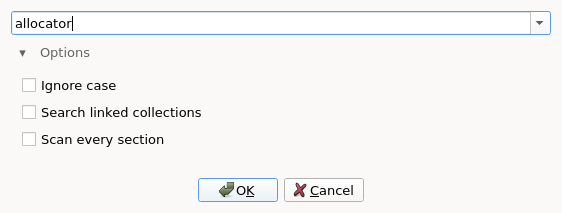
Find KEXT string prompt
The query prompt, with the Options group expanded
Behind the Options group (collapsed by default):

  • Ignore case — match the needle whatever its case.

  • Search linked collections — also search the collection this one links to, which on a macOS System KC is its Boot KC.

  • Scan every section — by default only the sections that hold strings are read. This reads the rest of each KEXT too: slower, and it finds the same text wherever else it is embedded.

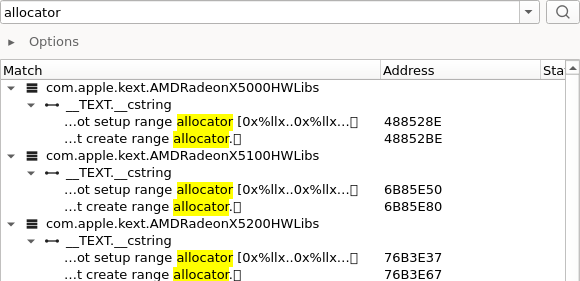
Confirming runs the search and opens the KC strings panel with the matches. The panel keeps the same query field and Options, so you can refine in place — edit the text and press Enter, or click the Search button.

KC strings panel
The KC strings panel after a search; each row marks the match inside the bytes around it

Unlike Symbol, this works on a stripped cache: the symbol tables are gone there, the string sections are not.

Result tree

Hits are grouped by the KEXT that owns them, and under it by the section they sit in. Each leaf marks the part of its text that matched, and carries the address and whether its KEXT is currently loaded.

Double-clicking a leaf jumps to the hit, mapping the owning KEXT first if it is not loaded yet.

See Kernelcache Workflow.

Last updated

Was this helpful?