> For the complete documentation index, see [llms.txt](https://docs.hex-rays.com/llms.txt). Markdown versions of documentation pages are available by appending `.md` to page URLs; this page is available as [Markdown](https://docs.hex-rays.com/ida-9.5/core/disassembler/concepts/kc-workflow.md).

# Apple Kernelcache

This page walks through how IDA 9.5 lets you analyse an Apple kernelcache: opening one, navigating its contents from the **KC Index**, loading the KEXTs you actually care about, locating things across the cache without loading anything first, and what IDA reconstructs of the IOKit class hierarchy.

If you already know the [Dyld Shared Cache](/ida-9.5/core/disassembler/concepts/dsc-workflow.md) workflow, this one will feel familiar: same index, same on-demand loading, same locators. The differences are the ones the format forces, and they are called out below.

## Opening a kernelcache

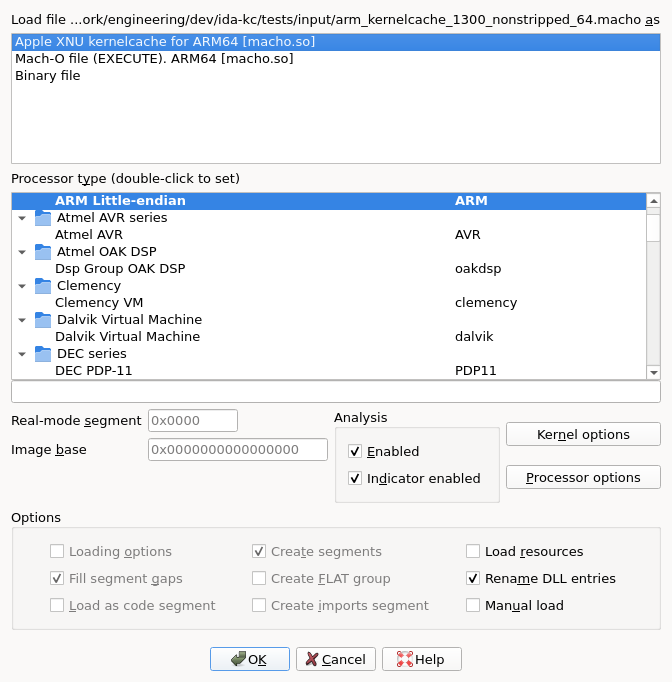
Apple ships the XNU kernel and its drivers as one container rather than as files. IDA recognises three shapes of it, and the loader offers a single **Apple XNU kernelcache** entry for all of them:

* **Fileset** (iOS 16+, and recent macOS) — the modern layout. The kernel and every KEXT are `LC_FILESET_ENTRY` subfiles of one Mach-O, sharing a single `__LINKEDIT`.
* **Prelinked** (iOS 11 and older) — the KEXTs live inside `__PRELINK_TEXT`, described by a plist in `__PRELINK_INFO`.
* **Split KernelCollections** (recent macOS) — `BootKernelExtensions.kc` and `SystemKernelExtensions.kc`. The system collection *links against* the boot one; see [Linked collections](#linked-collections).

As with a shared cache, the loader's job is only to map what is needed to navigate: by default the kernel itself, leaving the hundreds of KEXTs for you to load on demand.

<figure><img src="https://492083732-files.gitbook.io/~/files/v0/b/gitbook-x-prod.appspot.com/o/spaces%2FFP6ibt8r6WPBHTqekG9u%2Fuploads%2Fgit-blob-27ed550c9d8e3b4f76b05a14ad7cdf1766df555e%2Fkc_open_dialog.png?alt=media" alt="The Load file dialog on a kernelcache"><figcaption><p>The loader chooser, with the kernelcache entry picked for you</p></figcaption></figure>

## The KC Index

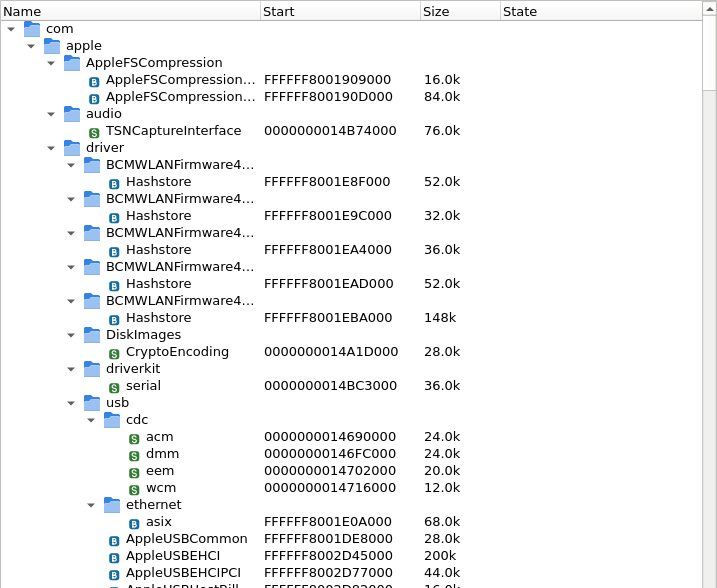
The **KC Index** is the entry point to everything else. It is a tree of every region of the cache, grouped by the KEXT that owns it, with sizes, addresses and whether the KEXT is currently loaded.

<figure><img src="https://492083732-files.gitbook.io/~/files/v0/b/gitbook-x-prod.appspot.com/o/spaces%2FFP6ibt8r6WPBHTqekG9u%2Fuploads%2Fgit-blob-f5b68ecd0803c5c462a127460028713e935d2d7f%2Fkc_index_collapsed.png?alt=media" alt="KC Index widget, collapsed"><figcaption><p>The KC Index widget, bundle identifiers collapsed</p></figcaption></figure>

If you close the panel, reopen it through the [KernelCache (KC) index](/ida-9.5/ida-actions/openkcindex.md) action under **View > Open subviews**.

KEXTs are named by their bundle identifier, and the tree nests on the dots, so `com.apple.iokit.IONetworkingFamily` sits under `com` → `apple` → `iokit`. That groups Apple's families the way you would expect to browse them.

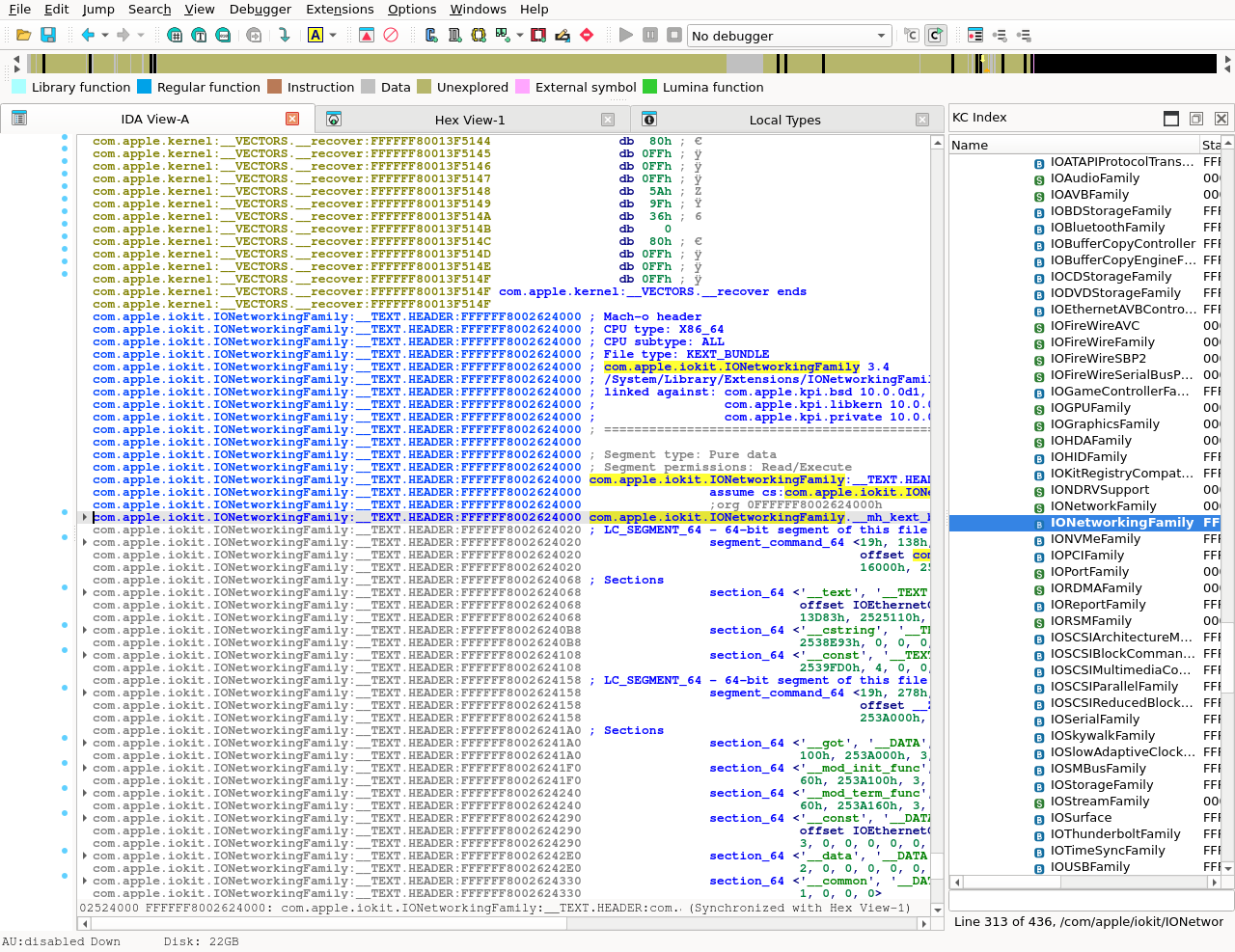
<figure><img src="https://492083732-files.gitbook.io/~/files/v0/b/gitbook-x-prod.appspot.com/o/spaces%2FFP6ibt8r6WPBHTqekG9u%2Fuploads%2Fgit-blob-041ee7131963c8626a7eb5eadd46417a2aac1687%2Fkc_index_full.png?alt=media" alt="KC Index widget, expanded"><figcaption><p>The KC Index, with one KEXT loaded: bold, sized, and marked <code>Loaded</code></p></figcaption></figure>

Each KEXT also carries what its bundle plist declares: its version, the `.kext` it was built from, the classes its `IOKitPersonalities` name, and what it was linked against.

{% hint style="info" %}
The small letter beside each KEXT says which collection it came from: **B** for the boot collection, **S** for the system one, **A** for an auxiliary one. On a cache that has only one, the badges are all the same and tell you nothing; on a [linked pair](#linked-collections) they are how you tell at a glance whether a KEXT is from the cache you opened or from its sibling.

When a cache does span more than one collection, the index's context menu also gains **Show contents for**, which hides and shows each of them.
{% endhint %}

## On-demand loading

As in the shared cache, any address may or may not be backed by loaded bytes at any moment. Cross-references to unmapped addresses do not break, decompilation does not abort, and you can load more whenever you want.

A load is triggered by double-clicking a KEXT in the KC Index, or by navigating to an unmapped address in the listing. Either way the KEXT's segments are created, its symbols applied, and the view follows.

<figure><img src="https://492083732-files.gitbook.io/~/files/v0/b/gitbook-x-prod.appspot.com/o/spaces%2FFP6ibt8r6WPBHTqekG9u%2Fuploads%2Fgit-blob-909decc10a38605b70bcd7304cd2c6915dc9e8b2%2Fkc_ondemand.png?alt=media" alt="A KEXT loaded on demand"><figcaption><p>Just after a double-click: the KEXT's segments arrive, the listing lands on its Mach-O header, and the index highlights the row</p></figcaption></figure>

Loading a KEXT is not only a mapping step. Everything IDA derives from the runtime — the [class hierarchy](#the-osmetaclass-class-hierarchy) in particular — is recomputed for the KEXTs that just arrived, and added to what earlier passes found.

## The Functions list

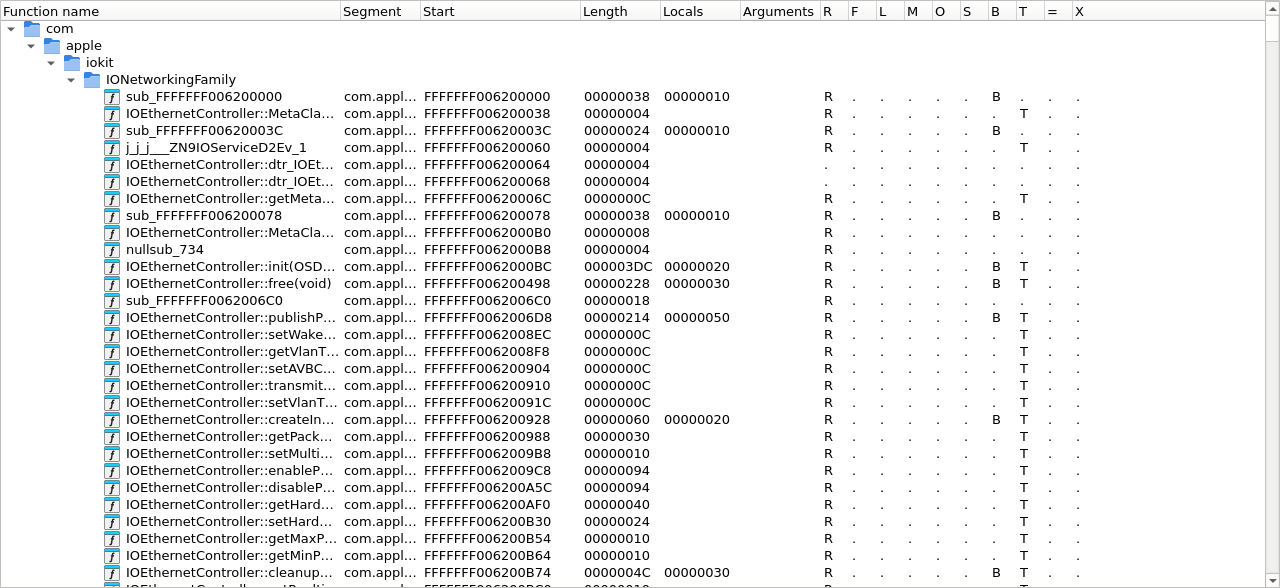
A kernelcache maps hundreds of drivers into one address space, so without grouping their functions would be a single flat heap. They are not: each KEXT's functions go into a folder of their own, named after its bundle identifier and nested on the dots, the same way the [KC Index](#the-kc-index) nests them.

<figure><img src="https://492083732-files.gitbook.io/~/files/v0/b/gitbook-x-prod.appspot.com/o/spaces%2FFP6ibt8r6WPBHTqekG9u%2Fuploads%2Fgit-blob-86bf1e2a0fea0fa1ecf9a35632a9b2280eccf12a%2Fkc_functions_folders.png?alt=media" alt="The Functions list, grouped by KEXT"><figcaption><p><code>IONetworkingFamily</code>'s functions, under the folders its bundle identifier spells out</p></figcaption></figure>

The folder name is a [configuration option](#configuration); set it to group drivers differently, or to the empty string for a flat list.

## Linked collections

A macOS System KC is only half the picture: what it references lives in the Boot KC beside it. When IDA opens one and finds its sibling next to it on disk, it harvests it, and the KC Index shows both collections.

This matters most when searching. A symbol or string that the system collection does not have may well be in the boot one, which is what the **Search linked collections** option on the two locators is for.

## Locating important information

You will often need to look up a symbol or a string coming from a panic log, a stack trace or an external tool. Three locator actions sit in the KC Index context menu, and all of them work across the whole cache **without loading anything first** — they read the cache file directly, so a KEXT nobody has mapped is searched like any other:

* [Symbol](/ida-9.5/ida-actions/kclocatesymbol.md) — substring search across the KEXTs' symbol tables.
* [String](/ida-9.5/ida-actions/kclocatestring.md) — substring search across the KEXTs' string sections.
* [Address](/ida-9.5/ida-actions/kclocateaddress.md) — given an address, report which region, KEXT and collection it belongs to.

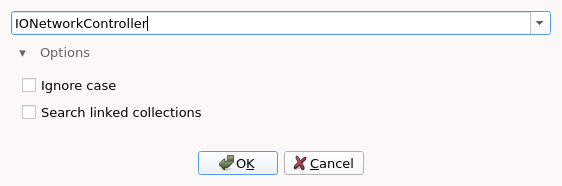
The two substring locators work like their [DSC counterparts](/ida-9.5/core/disassembler/concepts/dsc-workflow.md#locating-important-information): the action first opens a query prompt with a history and a collapsible **Options** group; confirming opens the **KC symbols** / **KC strings** results panel, which keeps the query field so further searches can be refined in place.

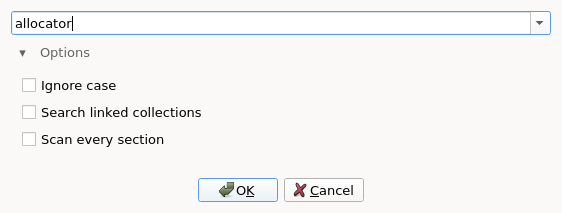
<figure><img src="https://492083732-files.gitbook.io/~/files/v0/b/gitbook-x-prod.appspot.com/o/spaces%2FFP6ibt8r6WPBHTqekG9u%2Fuploads%2Fgit-blob-8c51ee2d6a4c8192f8fe9b2c9bf89332ed65729f%2Fkc_locate_symbol_prompt.png?alt=media" alt="Find KEXT symbol prompt"><figcaption><p>The symbol query prompt, with the Options group expanded</p></figcaption></figure>

<figure><img src="https://492083732-files.gitbook.io/~/files/v0/b/gitbook-x-prod.appspot.com/o/spaces%2FFP6ibt8r6WPBHTqekG9u%2Fuploads%2Fgit-blob-71a797cd20e2d6a85a875f6f8b60ccbf000e3993%2Fkc_locate_string_prompt.png?alt=media" alt="Find KEXT string prompt"><figcaption><p>The string prompt, which carries one option more than the symbol one</p></figcaption></figure>

The options differ slightly from the shared cache's:

* **Ignore case** — as elsewhere.
* **Search linked collections** — widen the search to the Boot KC, as described in [Linked collections](#linked-collections).
* **Scan every section** (strings only) — by default only the sections that hold strings are read. This scans the rest of each KEXT too, which is slower and finds the same text wherever else it is embedded.

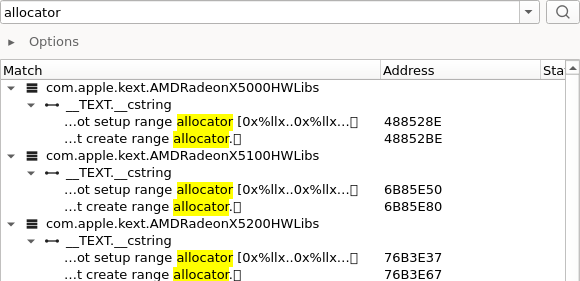
In the results, each row marks where in its text the match landed — useful for strings, where the row is a window onto the surrounding bytes, and for symbols, where the match is buried in a mangled name.

<figure><img src="https://492083732-files.gitbook.io/~/files/v0/b/gitbook-x-prod.appspot.com/o/spaces%2FFP6ibt8r6WPBHTqekG9u%2Fuploads%2Fgit-blob-b6a3f209effc119d789fe6f0ed3ae13eac5dff3c%2Fkc_locate_string.png?alt=media" alt="KC strings panel"><figcaption><p>The KC strings panel after a case-insensitive search for <code>allocator</code>; each row marks the match inside the bytes around it</p></figcaption></figure>

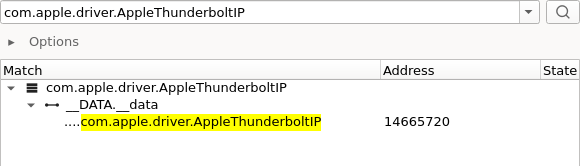
**Scan every section** is worth reaching for when a string is not where strings usually live. Here the needle is found nowhere by the default scan, and once in a KEXT's `__DATA.__data` with the option on:

<figure><img src="https://492083732-files.gitbook.io/~/files/v0/b/gitbook-x-prod.appspot.com/o/spaces%2FFP6ibt8r6WPBHTqekG9u%2Fuploads%2Fgit-blob-ef07a920acbe34890d6a6d8f22db97f52f4c4033%2Fkc_locate_string_all_sections.png?alt=media" alt="KC strings panel, scanning every section"><figcaption><p>A match the default scan does not reach, found in <code>__DATA.__data</code></p></figcaption></figure>

**Search linked collections** reaches the other half of a split pair. This needle is in no KEXT of the system collection; with the option on it comes back once, at an address belonging to the boot one:

<figure><img src="https://492083732-files.gitbook.io/~/files/v0/b/gitbook-x-prod.appspot.com/o/spaces%2FFP6ibt8r6WPBHTqekG9u%2Fuploads%2Fgit-blob-4b081832d46878d89a46f83570cdf125b6a9c8d0%2Fkc_locate_string_linked.png?alt=media" alt="KC strings panel, searching the linked collection"><figcaption><p>Found only in the linked Boot KC, at a boot-collection address</p></figcaption></figure>

### Stripped caches

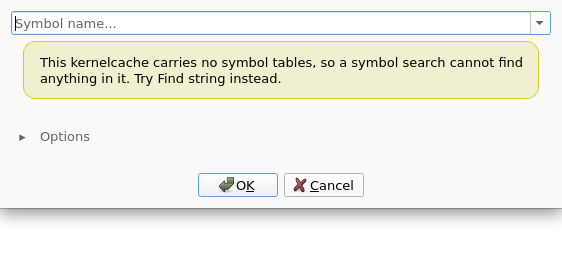
Modern iOS kernelcaches carry no symbol table at all. A symbol search there cannot succeed however you spell the needle, so IDA says so up front rather than returning an empty result that reads like a missing needle:

<figure><img src="https://492083732-files.gitbook.io/~/files/v0/b/gitbook-x-prod.appspot.com/o/spaces%2FFP6ibt8r6WPBHTqekG9u%2Fuploads%2Fgit-blob-2fdc34e632fe137182f1b3641886d3278699ee6a%2Fkc_locate_symbol_stripped.png?alt=media" alt="Find KEXT symbol prompt on a stripped cache"><figcaption><p>On a stripped cache, the symbol prompt says why nothing can match</p></figcaption></figure>

The string locator is unaffected: the symbol tables are gone, the string sections are not. And the class names recovered below come from the runtime rather than from any symbol table, so they survive stripping too.

## The OSMetaClass class hierarchy

IOKit drivers are C++, and XNU carries its own runtime for them: every class registers itself at load time by constructing a static `gMetaClass` object. IDA reads that runtime back.

Each class's registration runs from its KEXT's `__mod_init_func` as:

```cpp
OSMetaClass::OSMetaClass(&X::gMetaClass, "X", &Super::gMetaClass, sizeof(X));
```

which names the class, locates its descriptor, names its superclass and gives its instance size — **all without a single symbol**, which is what makes this work on a stripped cache.

Starting from the module-initialisation functions, IDA:

* **recovers every class**: its name, its `gMetaClass` descriptor, its superclass and its instance size, by decoding the arguments of each registration call;
* **names and types the descriptors**, so `X::gMetaClass` reads as itself in the listing and in cross-references;
* **rebuilds the hierarchy**, base before derived;
* **synthesizes an instance struct** per class, inheriting from its superclass's;
* **finds and names both vtables** of each class — the object vtable and the one belonging to its `X::MetaClass` — typing them from the platform's own type library, which IDA picks by kernel version, so each slot carries the name and signature that kernel gives it;
* **creates the methods** the vtable slots point at, and names them;
* **types the result of `OSDynamicCast`/`metaCast`** at the call site, from the metaclass the cast refers to;
* **re-runs as KEXTs are loaded**, adding to what earlier passes found. The pass is idempotent.

A [DriverKit](/ida-9.5/core/disassembler/concepts/driverkit.md#class-recovery) driver lists the same facts in a table rather than in calls, and IDA builds its classes' instance structs and typed vtables the same way.

On arm64, the kernel's own DriverKit classes, such as `IOService`, also get their [remote-call message IDs](/ida-9.5/core/disassembler/concepts/driverkit.md#remote-methods) and unnamed proxies named.

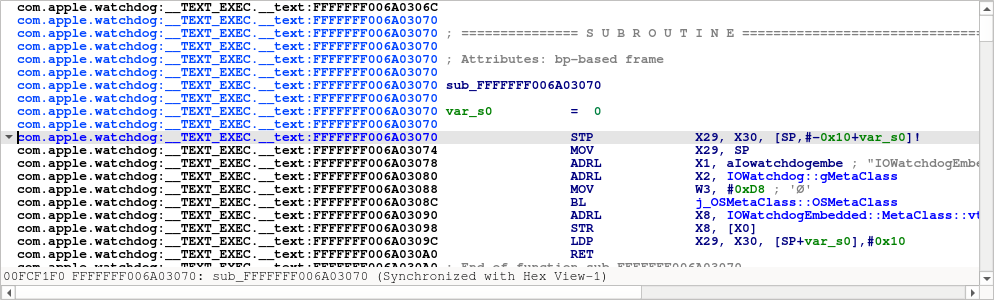
In the listing, a registration reads as the C++ above: the class name, its superclass's descriptor and its instance size, all named.

<figure><img src="https://492083732-files.gitbook.io/~/files/v0/b/gitbook-x-prod.appspot.com/o/spaces%2FFP6ibt8r6WPBHTqekG9u%2Fuploads%2Fgit-blob-0c254dea7acfdbe392f44fb3b997f806cca31853%2Fkc_osmetaclass_disasm.png?alt=media" alt="A class registering itself, in the disassembly"><figcaption><p><code>IOWatchdogEmbedded</code> registering itself, with its superclass's descriptor and the vtable its constructor installs</p></figcaption></figure>

The decompiler makes the same call plainer still:

<figure><img src="https://492083732-files.gitbook.io/~/files/v0/b/gitbook-x-prod.appspot.com/o/spaces%2FFP6ibt8r6WPBHTqekG9u%2Fuploads%2Fgit-blob-5650d17db2c4a09676e48bd9beaa1ab3dba5c7ff%2Fkc_osmetaclass_pseudo.png?alt=media" alt="The same registration, decompiled"><figcaption><p>The same function decompiled: the name, the superclass and <code>sizeof</code> the instance</p></figcaption></figure>

What that buys a reader shows up away from the registration. Here a method IDA named from a vtable calls one it resolved through another, and the `OSDynamicCast` between them names the metaclass it tests against:

<figure><img src="https://492083732-files.gitbook.io/~/files/v0/b/gitbook-x-prod.appspot.com/o/spaces%2FFP6ibt8r6WPBHTqekG9u%2Fuploads%2Fgit-blob-fe635aa16817b58ba8f86d6182b7c99107d6eddb%2Fkc_osmetaclass_vcall.png?alt=media" alt="A virtual call through a recovered vtable"><figcaption><p><code>IOWatchdogUserClient::start</code> dispatching to <code>IOService::start</code>, and a cast against <code>IOWatchdog::gMetaClass</code></p></figcaption></figure>

And the types land in the database, where you can use them: an instance struct that derives from its superclass's, and a vtable struct whose inherited slots carry the names and prototypes the kernel gives them.

<figure><img src="https://492083732-files.gitbook.io/~/files/v0/b/gitbook-x-prod.appspot.com/o/spaces%2FFP6ibt8r6WPBHTqekG9u%2Fuploads%2Fgit-blob-055c475ec18dbcc87521660e8a1ad6a1bc9ea89d%2Fkc_osmetaclass_types.png?alt=media" alt="The recovered types in Local Types"><figcaption><p>The recovered types: <code>IOWatchdogEmbedded : IOWatchdog</code>, and its vtable struct</p></figcaption></figure>

## Virtual calls through authenticated pointers

An arm64e kernelcache signs every function pointer, vtable slots included, and a virtual call authenticates the slot it loaded before branching through it:

```
LDR    X8, [X16,#8]!        ; the slot
...
MOVK   X16, #0xBBBF,LSL#48  ; the discriminator
BLRAA  X8, X16              ; authenticate the slot, then call it
```

The 16-bit discriminator the `MOVK` puts in place is not arbitrary: the compiler derives it from the name of the declaration that introduced the slot. So the pair *(slot index, discriminator)* names the method being called, whatever the object's dynamic type is at run time — and both halves are in the instruction stream, with no symbol involved.

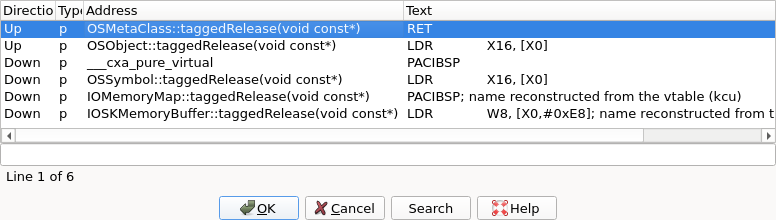
IDA reads that pair back. It indexes the vtables it knows — those the [class hierarchy](#the-osmetaclass-class-hierarchy) recovered, and any other run of authenticated pointers it finds in read-only data — and gives each authenticated call cross-references to the slots that match. The methods get the reference back, so a method that is only ever called virtually is no longer apparently unreferenced.

<figure><img src="https://492083732-files.gitbook.io/~/files/v0/b/gitbook-x-prod.appspot.com/o/spaces%2FFP6ibt8r6WPBHTqekG9u%2Fuploads%2Fgit-blob-58817ae674d90c5468b2359ac7deb92556991711%2Fkc_pac_vcall_xrefs.png?alt=media" alt="The cross references from an authenticated virtual call"><figcaption><p>One call in <code>OSArray::removeObject</code>, and the overrides of <code>OSMetaClassBase::taggedRelease</code> it can reach</p></figcaption></figure>

Two things to keep in mind when reading them:

* they are **candidates**, not an answer. A class and its overrides share a discriminator by design — that is what makes an override callable through the same slot — and 16 bits of hash collide, so a widely-overridden method such as a destructor can have hundreds of candidates while a rare one has exactly the right two or three;
* a call whose slot is not reached by any vtable IDA holds gets no reference at all, rather than a wrong one.

Nothing here depends on symbols, so a stripped cache resolves as well as a symbolicated one, and the index keeps up as KEXTs are mapped on demand.

## Configuration

`cfg/kcu.cfg` holds the kernelcache options. Each is documented in the file itself, at more length than here; this is what there is to look for.

| Option                        | What it does                                                                                                                                                      |
| ----------------------------- | ----------------------------------------------------------------------------------------------------------------------------------------------------------------- |
| `SEGNAME_FORMAT`              | How a KEXT's segments are named. Default `"%m:%S.%s"`, e.g. `com.apple.iokit.IONetworkingFamily:__TEXT.__text`.                                                   |
| `FUNC_FOLDER_FORMAT`          | How the [Functions list](#the-functions-list) folder of a KEXT is named. Default `"%M"`, one folder per KEXT under its bundle identifier; empty means no folders. |
| `BOOT_KC_PATH`, `SYS_KC_PATH` | Where the collections this one [links against](#linked-collections) are, when they do not sit next to the input file.                                             |

Both format options are built from the same pieces — `%m` the bundle identifier, `%M` the same as a path, `%b` its last component, `%c` the collection, `%S` and `%s` the Mach-O segment and section. A piece that does not exist takes its neighbouring punctuation with it. `cfg/dscu.cfg` spells the two the same way for the [shared cache](/ida-9.5/core/disassembler/concepts/dsc-workflow.md#configuration).

Some behaviour is driven by environment variables rather than the config file, for scripted and batch loads: `IDA_KCACHE_KERNEL`, `IDA_KCACHE_ALL` and `IDA_KCACHE_KEXT` choose what is mapped at load time, and the `IDA_KCU_NO_*` switches turn off the plugin's own passes. They are listed under [environment variables](/ida-9.5/core/disassembler/concepts/environment-variables.md#apple-kernelcache), and `kcu.cfg` documents them too.

## Scripting (`kcu_svc_t` API)

The whole workflow is driven by a public C++ service, `kcu_svc_t`, exposed through the `<kcu.h>` SDK header and the `ida_kcu` Python module. The same calls the UI makes are available to scripts and plugins: enumerate collections, KEXTs and regions; read a bundle's plist; find symbols and strings without loading anything; resolve an address; load KEXTs.

It mirrors [`dscu_svc_t`](/ida-9.5/core/disassembler/concepts/dsc-workflow.md#scripting-dscu_svc_t-api) closely enough that a script written against one is easy to port to the other.

For the shared-cache service itself, see [`dscu_query.py`](https://github.com/HexRaysSA/IDAPython/tree/9.5/examples/disassembler/dscu_query.py).

## Additional goodies (on-demand, not baked in)

Two IDAPython examples build on the service above. Neither is enabled by default — both are ad hoc, the Mach-O extraction especially — so drop the file in your plugins directory when you want one.

### Extracting a KEXT as a standalone Mach-O

A KEXT inside a kernelcache is not a file you can hand to another tool: the builder splits its segments across the container, merges everybody's `__LINKEDIT` into one blob, and shares a single string pool between all of them. IDA ships an IDAPython example that reassembles one — see [Extracting cache images](/ida-9.5/core/disassembler/concepts/extracting-cache-images.md), which covers kernelcaches and shared caches alike.

### Browsing the typed allocations

From iOS 16 and macOS 13 on, an allocation of a known type does not pass a size: the `kalloc_type()` macro emits a descriptor naming the type, giving its size and mapping which of its eight-byte granules hold pointers, and passes that instead. IDA reads those to name and lay out the types; `get_kalloc_views()` hands them back, and `get_kalloc_view()` reads the one at an address.

Ask for a type by name rather than walking the cross-references of a descriptor you happened to find: a type is commonly described by several descriptors — on a current iOS kernel, more than half of them are — so one descriptor's references are only part of the answer to "what allocates this type".

[`kalloc_type_views.py`](https://github.com/HexRaysSA/IDAPython/tree/9.5/examples/disassembler/kalloc_type_views.py) is a plugin built on those two calls: Ctrl+Alt+K gives a browser of every type the cache allocates, with the allocation sites of any of them.

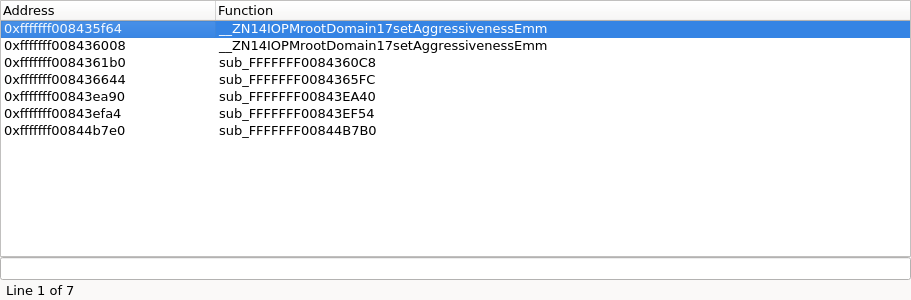
<figure><img src="https://492083732-files.gitbook.io/~/files/v0/b/gitbook-x-prod.appspot.com/o/spaces%2FFP6ibt8r6WPBHTqekG9u%2Fuploads%2Fgit-blob-056a0a7b8ab05216ac905e7cd9eb0b2626128ada%2Fkc_kalloc_views_browser.png?alt=media" alt="The typed-allocation browser"><figcaption><p>One row per type: the image it belongs to, its size, and what its granules hold</p></figcaption></figure>

<figure><img src="https://492083732-files.gitbook.io/~/files/v0/b/gitbook-x-prod.appspot.com/o/spaces%2FFP6ibt8r6WPBHTqekG9u%2Fuploads%2Fgit-blob-82ccac7e0e8f2219d94858e0868b075f1c4cd5ad%2Fkc_kalloc_views_sites.png?alt=media" alt="The allocation sites of one type"><figcaption><p>Every place a type is allocated, through all of the descriptors describing it</p></figcaption></figure>

## See also

* [Dyld Shared Cache](/ida-9.5/core/disassembler/concepts/dsc-workflow.md) — the same workflow, for Apple's userland cache.
* [Apple DriverKit](/ida-9.5/core/disassembler/concepts/driverkit.md) — the same object model, in user-space drivers.
* [Extracting cache images](/ida-9.5/core/disassembler/concepts/extracting-cache-images.md) — writing a KEXT out as a standalone Mach-O.


---

# Agent Instructions
This documentation is published with GitBook. GitBook is the documentation platform designed so that both humans and AI agents can read, navigate, and reason over technical content effectively. Learn more at gitbook.com.

## Querying This Documentation
If you need additional information that is not directly available in this page, you can query the documentation by asking a question.

Perform an HTTP GET request on the following URL with the `ask` and `goal` query parameters:

```
GET https://docs.hex-rays.com/ida-9.5/core/disassembler/concepts/kc-workflow.md?ask=<question>&goal=<user_goal>
```

`ask` is the immediate question: it should be specific, self-contained, and written in natural language.
`goal` is what the user is ultimately trying to achieve, the reason they need the answer. Sharing it helps GitBook give you a better, more relevant answer. A goal is most helpful when it describes the outcome the user wants rather than restating the question. For example, with `ask=how do I create an API token`, a goal like `automate deployments from our CI pipeline` lets GitBook tailor the answer to that use case.

The response will contain a direct answer to the question and relevant excerpts and sources from the documentation.

Use this mechanism when the answer is not explicitly present in the current page, you need clarification or additional context, or you want to retrieve related documentation sections.